Research mode can be used in some instances where you’ve received a “Processing Failed: Alignment of Brain to Atlas Unsuccessful” error.
NeuroQuant is designed with a cut-off threshold for “goodness of fit” of alignment of patient brain to the neuroanatomical atlas. In moderate cases, enabling research mode in the user interface will relax this criterion, and may allow the scan to process.
Moderate cases are typically instances where the Measurement Index (MI) is between 5 and 6. The MI is a numerical measure of similarity between a subject scan and the brain atlas. Enabling research mode may permit processing of cases that failed due to the brain atlas alignment error with the MI less than 6.
If the MI is greater than 6, enabling research mode will not help and generating a NeuroQuant report will not be possible. Additionally, re-scanning the patient will not improve the ability of NeuroQuant to create a report. In these instances, the patient’s anatomy is too far out of normal range to be compared with normal healthy brains, thereby making the patient not a suitable candidate for NeuroQuant.
Research mode can be enabled from the NeuroQuant user interface by checking the research mode ENABLED box. This action will allow NeuroQuant to be used for research / non- clinical processing with relaxed atlas alignment checks.
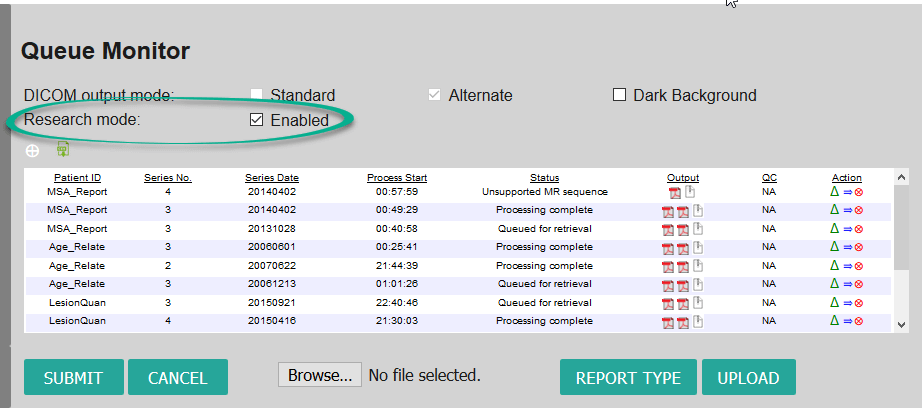
When research mode is enabled, the segmentation output will need to be carefully reviewed by a radiologist to verify accuracy. Finally, when the case is finished processing, the enabled box will need to be deselected, as this mode is for non-clinical use and should not be used for normal report processing.
Do you have a technical question or support need?
The Cortechs.ai Support Team is available Monday through Friday from 7 AM to 5 PM PT. Emailing support@cortechs.ai is the easiest and best way to reach the Cortechs.ai Support Team during and after hours. If you send your email directly to a specific team member, he/she could be busy assisting another customer, and responses may be delayed.