The 2.3 LesionQuant module of NeuroQuant (FDA cleared, CE marked) makes it easy for physicians to configure two specific lesion segmentation parameters to help define lesions during their review and to aid in their assessment of disease activity on MRIs from new and enlarging T2 FLAIR lesions.
User Configured Lesion Segmentation Parameters
- Minimum Lesion Size: For LesionQuant, a lesion is defined as a volume greater than 4 mm3, which appears brighter than gray matter and white matter on a 2D or 3D T2 FLAIR image. The default setting for lesion size is 4 mm3. However, users can set this parameter from 4 mm3 to 64 mm3, in order to increase the minimum size of a lesion being reported in the output.
- Minimum Lesion Separation: LesionQuant defines separate lesions as 1 mm voxels away from another lesion. The default setting for lesion separation is 3 mm, however, users can set this parameter between 1 and 5 mm. We recommend 2 mm for 3D/3T images and 3 mm for other scanner teslas and images.
Modifying the Lesion Segmentation Parameters
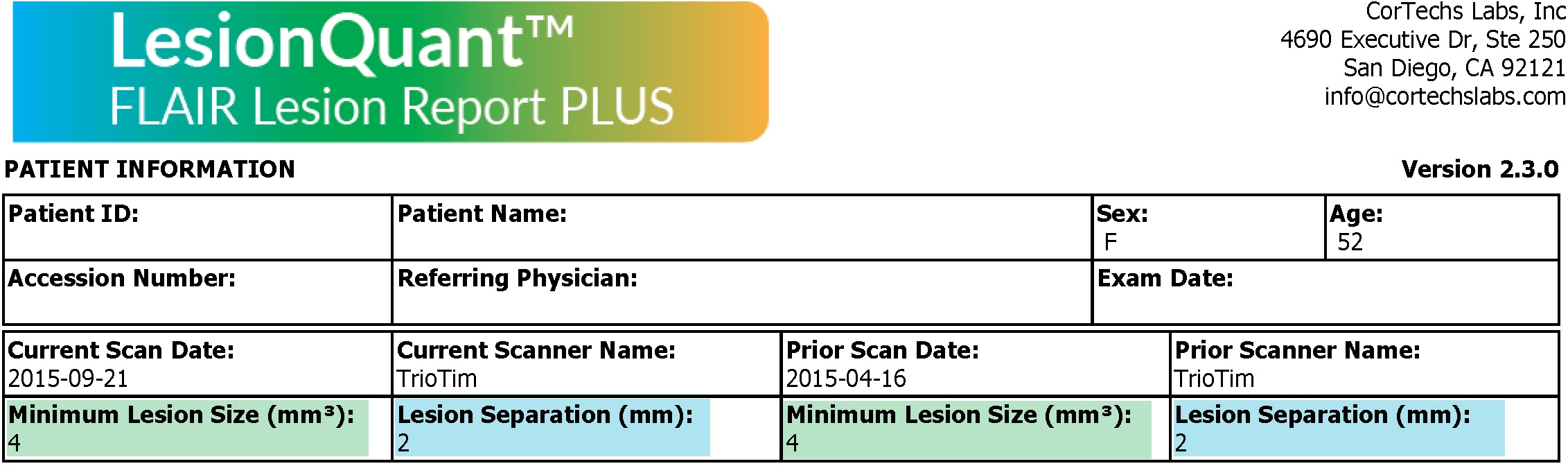
To configure these parameters, LesionQuant users can set their desired lesion segmentation settings for both lesion size and lesion separation in the Site Configuration tab in the user interface.
The selected lesion segmentation settings, for both current and prior scans, will be displayed on the top of the LesionQuant report.
Want to learn more about LesionQuant?
We recently had a webinar to discuss the new features available in the LesionQuant from our latest software release. We also examined with case studies how the LesionQuant can help physicians quantify brain structure and lesions and as well as help in effectively evaluating disease activity in MS, based on current guidelines and research.
Our LesionQuant white paper provides more information about the accuracy and reproducibility available using LesionQuant for fully automated FLAIR lesion segmentation.
Do you have a technical question or support need?
The Cortechs.ai Support Team is available Monday through Friday from 7 AM to 5 PM PT. Emailing support@cortechlabls.com is the easiest and best way to reach the Cortechs.ai Support Team during and after hours. Sending an email directly to a specific team member may result in delayed response time.