Interested in using the NeuroQuant Custom Report? Set up is quick, easy and tailored to clinical needs. And once the custom report is set up, studies are processed just like standard NeuroQuant reports.
The Custom Volumetric Report is a two-page report that allows clinicians to create a personalized report by choosing reference data and up to nine brain structures.
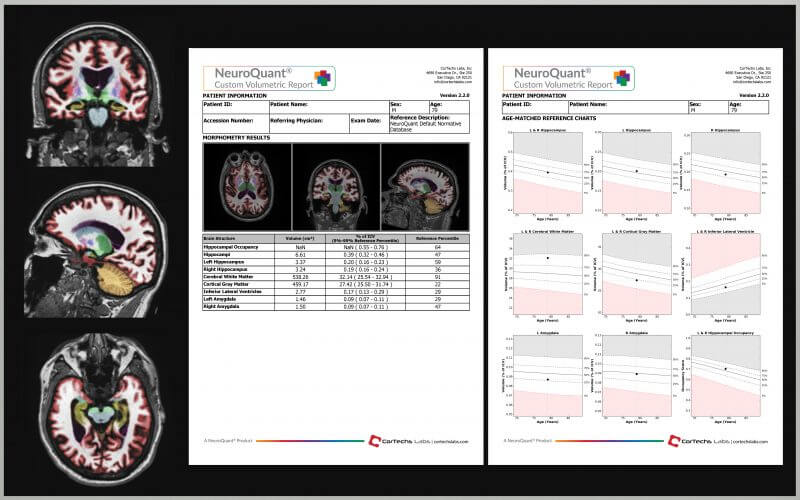
The standard normative reference data or alternative reference data can be used in custom reports. Cortechs.ai reference data allows patient brain volume results to be compared to age and gender matched cohorts. The reported normative percentile will be based on the reference database selected.
- Normative Reference Data is comprised of scan data from healthy subjects within the age range from 3 to 100 years. This reference data comparison automatically applied to NeuroQuant and LesionQuant reports and provides physicians with more information when evaluating patients.
- Alternative Reference Data contains only scan data of subjects within the age range of 55 to 100 years, who were diagnosed with Mild Cognitive Impairment (MCI) or Alzheimer’s disease (AD). The alternative reference data provides physicians with added information when evaluating patients with memory loss and/or monitoring disease progression.
With Custom Report, clinicians can incorporate brain structures not displayed in standard NeuroQuant report. Of the 71 available brain structures available for Custom Report users, up to 9 can be selected per report. Once the brain structure has been selected, users can specify left, right or total volume or left-right asymmetry.
Custom Reports can be setup through the Cortechs.ai user interface quickly and easily:
- Choose the desired reference data.
- Select up to nine structures.
- For each selected structure, choose the desired output information:
- Both = total volume of selected left and right structures
- Left = left structure volume
- Right = right structure volume
- Asym = asymmetry index (left – right asymmetry)
- Enter a name for the Custom Report.
- Assign an AETitle.
- Save the selections.
- Process your 3D T1 images.
The MCI and AD alternative reference data is not for clinical use. Contact your sales representative to enable the Custom Report feature.